ShipGuard
Zero-downtime CI/CD platform with security gates, canary traffic shifting, and automatic rollback
Zero-downtime deploys
10% canary shift
Automatic rollback
Security-gated builds
Overview
A complete AWS CI/CD pipeline that ships code to production using blue/green deployments with canary traffic shifting, then rolls back automatically when error rates spike no human intervention required. The five-stage CodePipeline runs security scanning (npm audit, Trivy, git-secrets) that blocks builds on high/critical vulnerabilities, deploys to staging with health validation, requires a manual approval gate, then shifts 10% of production traffic to the new version before completing. A CloudWatch alarm on 5xx error rate triggers CodeDeploy's native rollback. The entire infrastructure is defined in CloudFormation nothing is click-ops.
Architecture Diagram
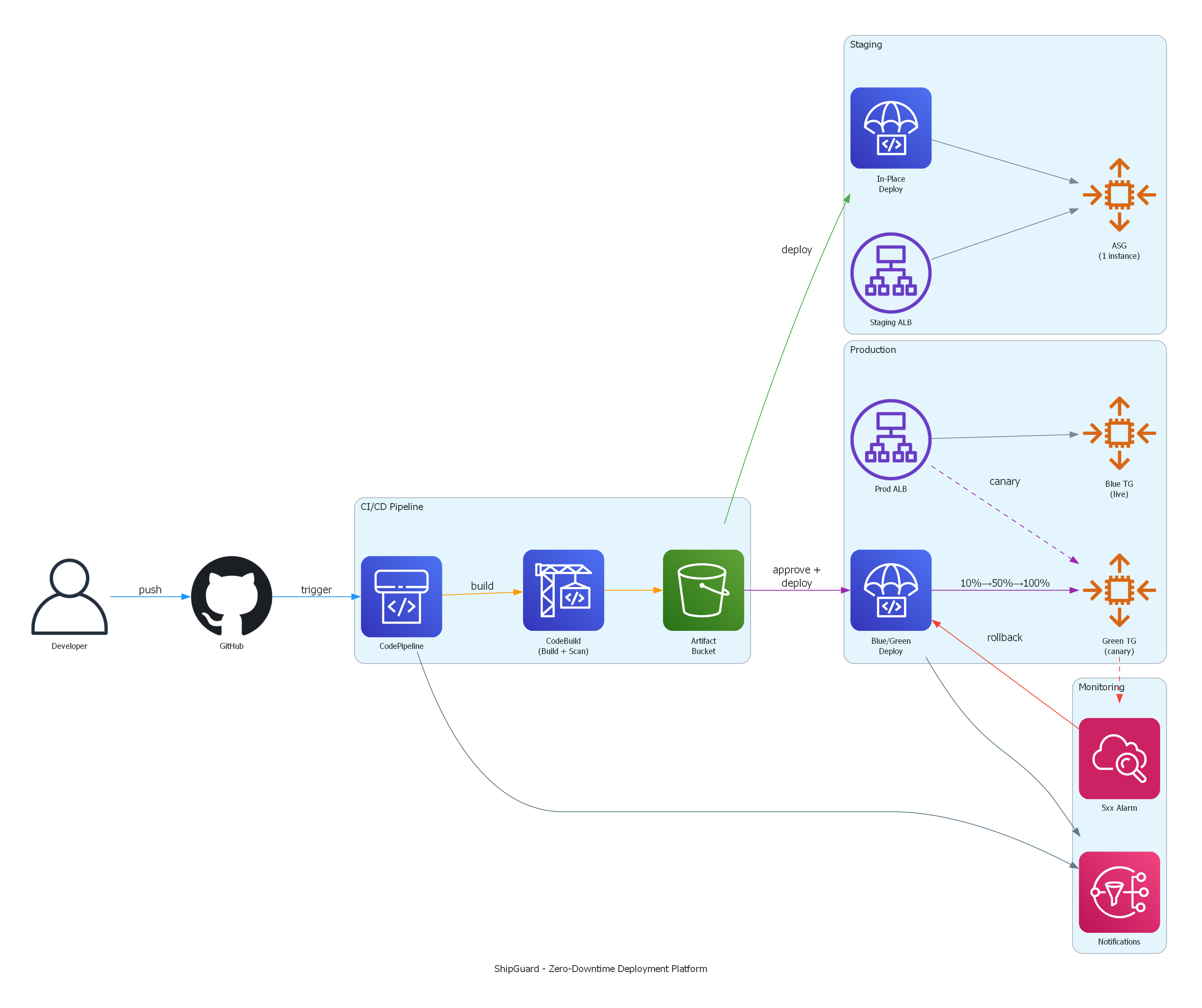
Design Decisions
- →Blue/green over rolling updates because rolling updates still drop connections during instance replacement. Blue/green with an ALB gives true zero downtime old instances keep serving until traffic fully shifts.
- →Canary traffic shifting over all-at-once because a bug that only appears under real traffic is caught when just 10% of users are affected, not all of them simultaneously.
- →CloudWatch alarm for rollback instead of custom logic because CodeDeploy has native alarm integration when the alarm fires, CodeDeploy handles rollback with zero custom code to maintain.
- →Separate CloudFormation stacks per environment for independent lifecycle management. Staging can be torn down without touching production, and a bad template change can't cascade across environments.
- →Security scanning (npm audit, Trivy, git-secrets) runs as a pipeline gate that blocks the build on high/critical findings, shifting security left before code ever reaches staging.
Deployment
The entire platform is defined in three CloudFormation templates with no click-ops. A five-stage CodePipeline takes code from GitHub to production: security scanning in CodeBuild (npm audit, Trivy, git-secrets), staging deployment with health validation, a manual approval gate, blue/green production deployment via CodeDeploy with 10% canary traffic shifting across an ALB with dual target groups, and an automatic rollback driven by a CloudWatch alarm on 5xx error rate. EC2 Auto Scaling Groups host the deployed TypeScript/Express app, and SNS handles pipeline notifications. Separate stacks per environment keep staging and production lifecycles fully independent.
Lessons Learned
The CodeDeploy blue/green configuration taught me how traffic routing actually works at the ALB level. The TimeBasedCanary deployment config only supports a single canary step natively (10% then the rest), so the 10% → 50% → 100% pattern I originally wanted required understanding the service's limits and designing around them. The IAM role chain was the trickiest part: CodePipeline assumes CodeBuild's role, which needs S3 access, which has to match the bucket policy. Getting the trust relationships right across four service roles took real iteration a reminder that least-privilege IAM is where a lot of pipeline debugging time actually goes.